

Fabric tenant settings are the top control layer for what is possible in your Microsoft Fabric environment.
This guide explains common settings, how access is layered, and which defaults are safest for production.
Important: Tenant setting names and locations can change as Fabric evolves—especially for preview features. Treat this guide as a governance pattern + decision framework, not a guarantee of UI labels.
Who this guide is for
- Fabric / Power BI admins
- Platform engineering teams
- Security and governance owners (Purview, DLP, access reviews)
- Data engineering and BI leads who need predictable “what can users do?” answers
TL;DR safe defaults (production)
If you only do 10 things:
- Disable Publish to web
- Restrict workspace creation to a controlled creator group
- Enable sensitivity labels and enforce downstream label inheritance where possible
- Restrict export/download for sensitive data (especially semantic models)
- Restrict all preview features to pilot groups
- Require capacity governance (who can use which capacity)
- Control OneLake external access (apps, SAS, file explorer)
- Enable auditing/monitoring and review regularly
- Use Git integration only for engineering workspaces with branch protection + PR reviews
- Enable Copilot only for a pilot group with data residency and Purview controls reviewed
Preview vs GA
What “Preview” really means
Preview features can change faster than your governance can keep up:
- Microsoft may change behavior, UX, or APIs without notice
- Support and SLAs may be limited
- Billing or capacity behavior may change
- Admin controls may move or be renamed
How to run previews safely
Policy: Treat preview features like “restricted production change.”
- Enable only in non-production first
- Allow only a pilot security group
- Add extra auditing/monitoring and cost tracking
- Document rollback steps (“how do we turn this off and recover?”)
Tip: Create a dedicated Entra ID group like
FABRIC-PREVIEW-PILOTand use it everywhere.
The Fabric access model (4 control layers)
Fabric actions require every layer to allow the operation.
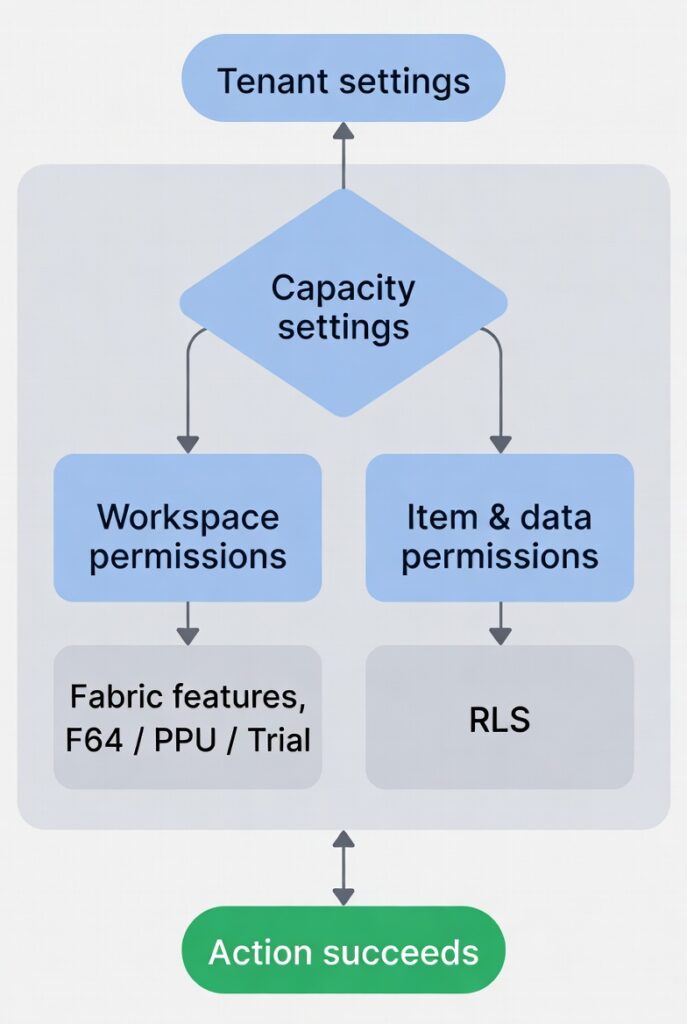
Layer 1: Tenant settings
- Decide whether a capability exists at all
- Many previews start here
Layer 2: Capacity settings
- Decide where workloads run
- Decide who can use that capacity (and who can’t)
Layer 3: Workspace roles
Common roles (names may vary by UI):
- Admin
- Member
- Contributor
- Viewer
Governance principle: Workspace Admins are powerful—limit this role.
Layer 4: Item + data permissions
Examples:
- Semantic model permissions like Read, Build, Reshare
- Dataset query results can still be exported depending on tenant settings
Key idea: If you allow “Build” widely, you may be allowing wider data extraction than intended—especially when combined with export, XMLA, REST query APIs, or external tools.
High-risk tenant settings (must be governed)
These settings commonly cause data leakage or uncontrolled sharing:
- Publish to web
- External data sharing (cross-tenant)
- Guest access
- Download and export controls
- OneLake external access
- SAS token usage
- R/Python visuals (or any feature that can execute code / pull external data)
Recommended practice: Put these into an admin-owned checklist and review quarterly.
